
Ulimit conflict with PAM and Systemd

Dec 10, 2017
12
Mins to Read

As a part of the MySQL Support, we had a support request from a client.The issue is DB server runs out of open files limit, though it is configured. It causes the DB hang and crash at times. Sometimes they can’t able to fix. So we plan to write our experience with configuring. We believe this article can help in configuring appropriate Ulimit value without any obstacles.
Let us jump to the subject.
What are the errors we might face while ulimit is not properly configured?
- Too many open files
- System unable to allocate necessary resources for the monitor thread
- can’t create new thread, closing connection
The above-shared list is just sample’s, maybe people who currently reading this blog may also face issue related to ulimit, for that they may have different debug message too.
What is ulimit in a simple term?
User limits command, limit the use of system-wide resources.
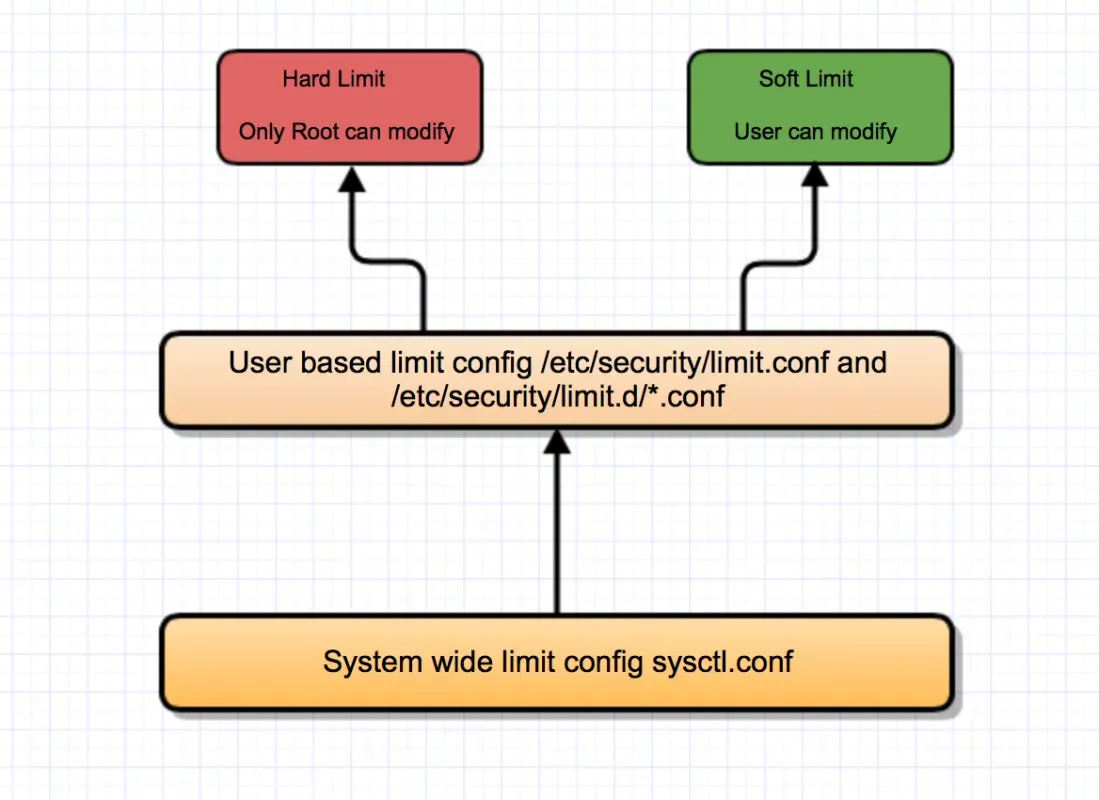
Where are the Ulimit Configuration file located and how it is loaded?
The ulimit resource configuration is located from the below file
/etc/security/limits.conf
/etc/security/limits.d/*.conf
By default /etc/security/limits.conf is loaded but it can be override by the configuration reside on /etc/security/limit.d/*conf.
ulimit resource limitation based on the Linux user. Every individual /etc/security/limit.d/*.conf are read and the file is parsed one after another in the order of “C” locale and concatenate together in the order of parsing.
As I have specified above, the file loaded from /etc/security/limit.d/*.conf in the order of “C” locale and apply, but there will be one exception. For example, we have two configurations in /etc/security/limit.d/ folder.
- alpha.conf
- mysql.conf
both files configured for resource limitation for mysql user(domain). Only mysql.conf applied because the file is in case the domain is the same or more specific.
How the default soft or hard limit for the number of user’s processes is applied?
The system wide configuration file /etc/security/limits.d/90-nproc.conf (RHEL5, RHEL6), /etc/security/limits.d/20-nproc.conf (RHEL7) specifies the default nproc limits as:
How PAM Modules related to /etc/security/limit.d/*.conf and /etc/security/limits.conf ?
The pam_limits PAM module sets limits on the system resources that can be obtained in a user session.
The /etc/pam.d/system-auth file is used by Red-Hat and like systems to group together common security policies. It is often included in other /etc/pam.d policy files where those common policies are required.
When accessing a system via ssh through sshd the /etc.pam.d/sshd policy file is consulted. This file includes /etc/pam.d/system-auth so your changes to /etc/pam.d/system-auth are valid.
The file /etc/pam.d/login is consulted when you log in via the /bin/login program, therefore, any changes to it only affect /bin/login.
login – rules for local (console login)
system-auth – common rules many services
password-auth – common rules for many remote services
sshd – rules for SSHD daemon only
How PAM create Obstacle while applying resource limit and How we mitigate?
After we allocate resource limit to the user, we try to login into the user account and check for the update resource information. But unfortunately, the new updated information not updated on the user login.
This happen because of pam module not properly configured to load the /etc/security/limit.d/*.conf and /etc/security/limits.conf . We need to apply the above line into the /etc/pam.d/login or system-auth or password-auth or sshd file.
In most cases pam_limits.so will be enabled by default. In some cases, it is not so we need to append session required pam_limits line on appropriate pam config file related to the login program. This modification required logout.
Below I have shown, how to configure pam_limits.so module in system-auth configuration and applying ulimit value to the user:
Environment:
Os: Centos 7.4
Kernel: 3.10.0-693.11.1.el7.x86_64
Current Status:
Logging in as mysql (nologin)
Validating the ulimit for mysql user after logging in
Trying to increase ulimit value for nofile and nproc by creating mysql.conf under /etc/security/limit.d/ dir:
Now login and check the current ulimit value for mysql user:
Ulimit value was not updated still, Now let us check the pam module:
We see observe that pam_limits.so is not enabled (commented).Now let us enable pam_limits.so and validate it.
Successfully we have updated the resource limit for the user.
After changing the ulimit settings, you must restart the process (mysqld) to take advantage of the modified settings. You can use the /proc file system to see the current limitations on a running process.
Conflict between ulimit and Systemd
Now mostly every Linux distribution moving from init or upstart to Systemd. Systemd is very mature layer between kernel and application. Unfortunately not every User and OS is fully integrated with it.
When service started using systemd, it won’t consider the ulimit value defined for the process owner. Systemd is providing an option to set a limit over process using systemd variable likes LimitNOFILE and LimitNPROC.
How to configure systemd to limit open files and process?
Login into MySQL user and checking the openfile limit and process limit for the MySQL user.
Validating current status of Mysql process using systemctl.
Check owner of the mysql process.
Finding openfile limit and process limit for MySQL process.
Even Though MySQL User(Domain) process and openfile soft limit were set to 55000, it is not affecting MySQL process it is still the older value of 1870 and 5000. This because of MySQL service is started using systemctl.
Fixing systemd MySQL service file
Open the systemd config for MySQL service and append the limits LimitNOFILE=55000 and LimitPROC=55000 under service category.
Reload the daemon and Restart the MySQL service.
Sometimes we get a conflict between unit file located in /etc/systemd/system/multi-user.target.wants/mysqld.service if you still face issues with resource limits have a look at this file too.
Hope this helps in modifying the ulimit values for a user and process.
Linux
No items found.







.svg)
